Errors when starting Clibor

Before using Clibor, make sure to unzip the downloaded Clibor.zip.

If you double-click Clibor.exe directly inside Clibor.zip without extracting it, you may see the following error message, and the application will not run.
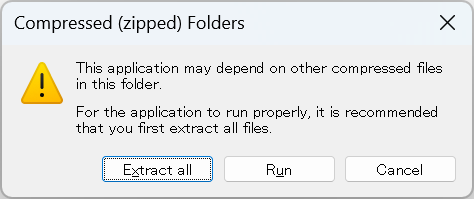
To use Clibor properly, first unzip the file, then run Clibor.exe.

Additional Explanation:

Clibor is distributed as a ZIP file.
If you try to launch Clibor.exe directly from within the ZIP archive using Windows Explorer, it will not function correctly.
To avoid errors, always extract the ZIP file before running Clibor.

My Work

Chigusa @chigusaweb

A working IT engineer. Coding and sharing tech insights on my own terms. Web apps / Windows & Mac apps / Mobile apps — and more. (Java, PHP, JavaScript, Swift, Python, C#, and others) Solo projects: Clibor, Quipha, TXT-Crypter, Chigusa Tools Kindle books: Laravel 9 in Practice, and more

Clipboard History

Clibor

Windows

A simple yet powerful clipboard history manager for Windows. Save frequently used phrases as templates, and access them from your clipboard anytime. Supports advanced text formatting, FIFO mode, and hotkeys.

Clipboard History

Everything you love about Clibor — now on Mac. Supports text templates, advanced formatting, FIFO mode, and more. Compatible with the latest macOS Tahoe.

Text Encryption

A free service to encrypt text and share or save it via URL. Only those with the passphrase can decrypt it. No sign-up required. No data stored on the server. Also available as a Notion integration.

Tools

A collection of web utilities for everyday productivity boosts. From text and data processing to the latest AI integrations — all the little tools you keep Googling, in one place.

Copied title and URL